Session Traces
Capture the full agent session — attempts, tool calls, exploration and verification — and measure Tokens-per-Verified-Outcome.
Track. Verify. Remember. Spend less.
Mark 1 runs in the background, learns from your agent's work, helps you verify outcomes, and turns experience into lower costs over time.
v0.1.14 · 20 Sep 2026 · Intel? Get the x64 build · Other platforms
 Claude Code
 Codex
 Gemini CLI
 opencode
 Copilot CLI
 Cursor
How it works
From agent activity to long-term improvement. A closed loop for more capable, efficient and reliable agents.
Capture the full agent session — attempts, tool calls, exploration and verification — and measure Tokens-per-Verified-Outcome.
Combine weak signals into calibrated outcomes, even when the repository has no test oracle.
Turn verified experience into reusable workflows, pitfalls, invariants and routing hints — without carrying raw code or trajectories.
Retrieve useful experience, choose repair or resample intelligently, and admit shared artifacts only when their measured utility clears the safety gate.
Backed by




More than memory
Everything you need to observe, verify, and improve your agents.
Capture every tool call, file access, and decision your agents make — with complete context.
Turn successful runs into reusable, composable knowledge that your agents can recall and follow.
Refund Policy
Automatically check if the agent's result is correct, complete, and grounded in real evidence.
Agent Answer
Customers can request a refund within 30 days of purchase.
Verification
Verified
Search across all your agent runs using natural language. Instantly reuse what worked before.
Works with the tools your agents already use. Zero changes to your existing workflows.
 Claude Code
 OpenAI
 Cursor
 GitHub Copilot
Better memory means fewer repeated mistakes, shorter runs, and lower token usage.
Private · Verifiable · Built for a higher purpose
— Same agents. More intelligence.
Arrests
Every retry is a bet. Mark 1 tracks the odds that the next attempt lands against what it will cost, and stops the loop when the bet is no longer worth it. You see the numbers it used.
Watch it work
The rule
p̂_LCB(n) · V(task) ≤ c(n)
When the lower bound on the chance that attempt n lands, times what the task is worth, is no more than what attempt n will cost, the loop stops. The verdict and the evidence go to you instead of into another retry.
Local caps, whatever the policy says
Pick the plans your team already pays for. Mark 1 sits beside them, arresting the retries that never needed to happen and routing the rest to the cheapest model that still verifies.
Your year, before and after
Wasted on retries
$9,600
You keep
$2,880
recovered by arrests, memory and routing
Mark 1 is $0 during the preview — arrests, memory and receipts included.
Get Mark 1 for macOSInspect the evidence behind Mark 1’s decisions.
Inspect.Understand.Trust.
Anchors
Anchors are approved checks or tools associated with a project. They represent the evidence sources Mark 1 can use when evaluating work.
More evidence.Better decisions.
Gates
Gates determine when Mark 1 may stop, block, or intervene in a workflow. This includes stop-gate settings and related consent configuration.
Safety built in.
Arrests
Arrests show requests or retry loops that Mark 1 stopped because continuing was inefficient, unsafe, or below the configured threshold.
Less waste.More signal.
Verdicts
Verdicts summarize the result of evaluating a task or outcome. Review how verdicts were distributed and which evidence contributed to them.
Every outcome.Backed by evidence.
Tamper
Tamper shows integrity problems or unexpected changes detected in the verification data. Identify when a result may no longer be trustworthy.
Trust throughtransparency.
Verify connects Mark 1’s conclusions to the evidence that supports them. Inspect, don’t just accept.
Illustrative — mock data.
Memory
Manage reusable knowledge from previous sessions.
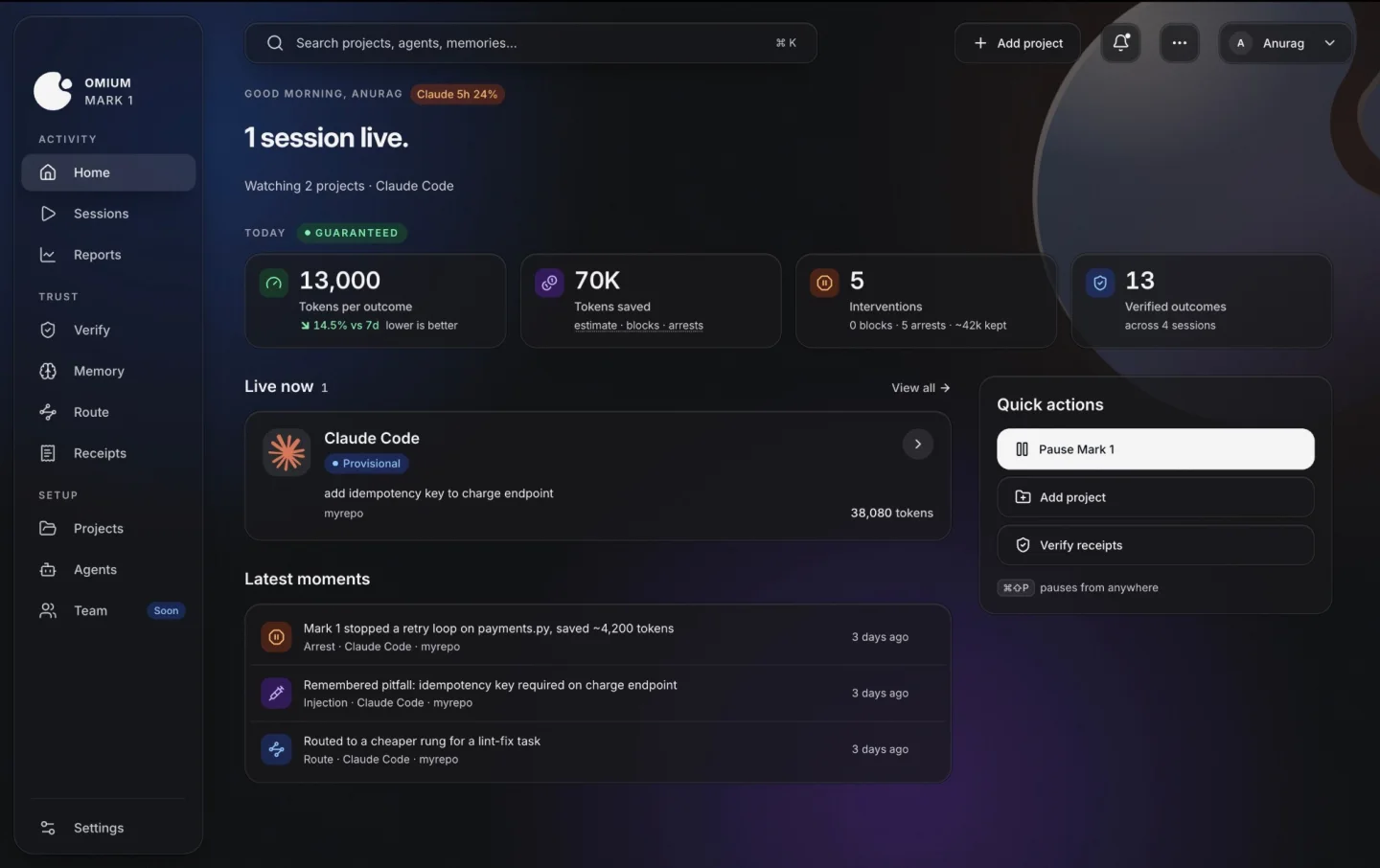
Memory stores useful artifacts extracted from earlier AI sessions and makes them available when they can help with future work.
Explore MemoryAll your knowledge
See the knowledge captured from previous sessions and curated for future use.
Understand the full picture
Browse extracted and retired artifacts, filter by type, and keep your memory clean and relevant.
See memory in action
See when and where memory is injected into sessions, and what impact it made.
Trace the impact
See which sessions used a memory artifact, what the outcome was, and how much time (and tokens) it saved.
Take control
Pin important artifacts, share with your team, retire outdated knowledge, and inspect exactly where each artifact was used.
A faster, more consistent future
Memory helps AI agents build on previous work instead of repeatedly exploring the same codebase, making future sessions faster and more consistent.
Previous sessions. A smarter tomorrow.
Illustrative — mock data.
Mark 1
The right model for every request.
Lower costs. Higher quality. More control.
Illustrative — mock data.
Proof
Every number on your dashboard traces to a receipt signed by your device and by our server. The verifier is a standalone binary that runs offline. Anyone can check a receipt. Nobody can edit one.
One receipt
Synthetic values, real field names. Hashes shortened for display.
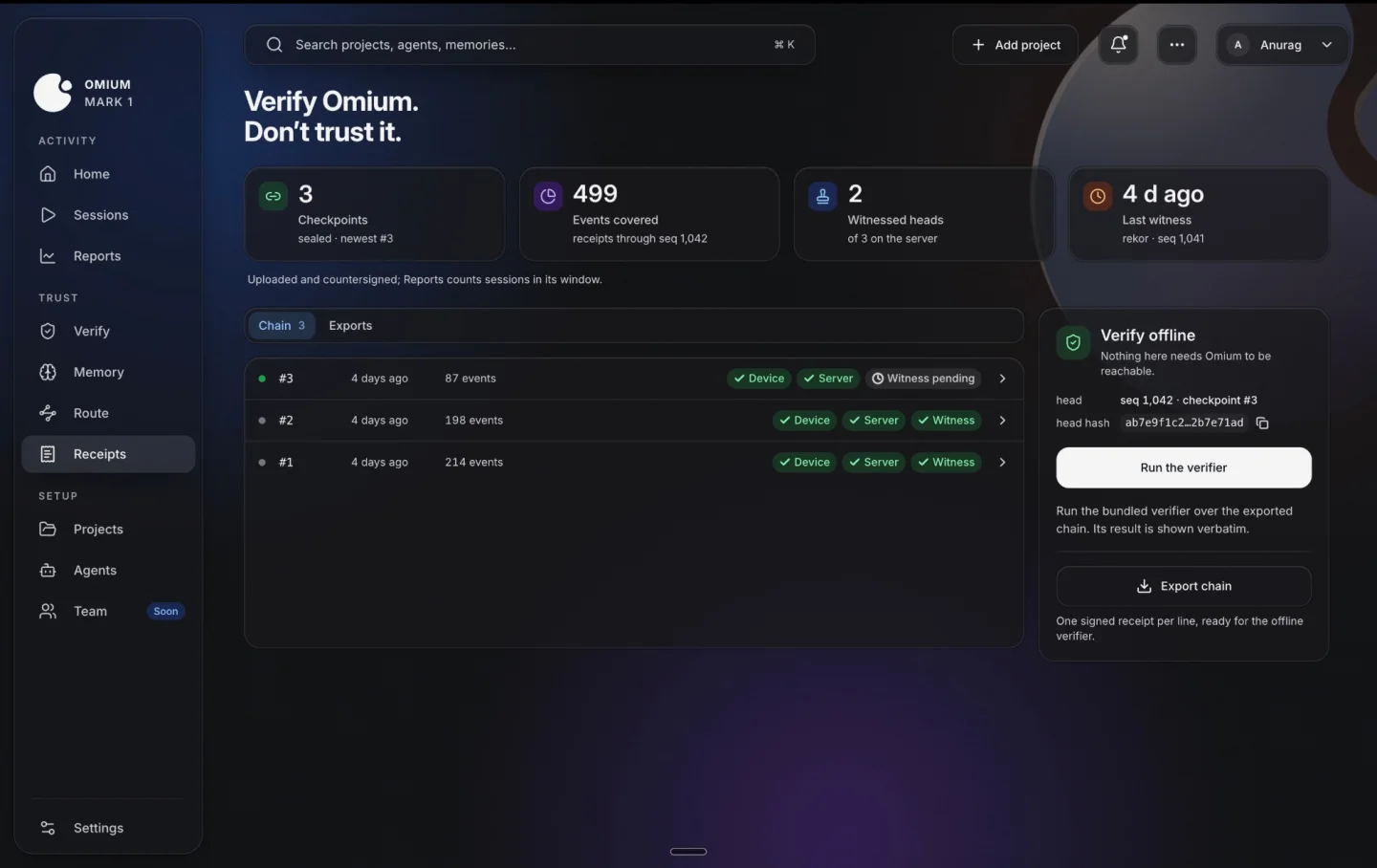
How much of the traffic Mark 1 actually saw. Every number carries it.
Dollars on API keys, quota on subscriptions. Never mixed in one report.
Below the coverage floor a number is indicative and says so. Guarantee-grade is refused, not softened.
Agents
Claude Code, Codex, Gemini CLI, opencode, Copilot CLI and Cursor. Mark 1 attaches through each agent's own hooks and config, never the binary. Pinned versions are listed, and anything it writes can be reverted byte for byte.
Anthropic
OpenAI


SST
GitHub
Anysphere
Pinned versions are listed in the app.
Download · macOS · Windows · Linux
Pick your platform. The first run asks for consent before it reads anything.
v0.1.14 · 20 Sep 2026 · Intel? Get the x64 build
Unsigned build. macOS: open it once, then System Settings → Privacy & Security → Open Anyway. Windows: More info, then Run anyway. Linux:
chmod +x the AppImage.
First run
Sign in with Omium.
One account for your team. Keys and sessions stay on your device.
Pick the agents and projects it may read.
Attaches through each agent’s own hooks — Claude Code, Codex, Gemini CLI and more.
Consent to the checks it runs.
Static checks on by default; test suites only where you turn them on.
Unsigned build
Signing is in progress. Until it lands, each OS asks for one confirmation on first open.
macOS 1 confirmation
Needed the first time you launch the app; every launch after is normal.
Windows 1 confirmation
Appears on the SmartScreen prompt; click through once and it remembers.
Linux one terminal line
chmod +x Mark1.AppImage./Mark1.AppImageRun both from the folder you downloaded to, then pin it like any app.
Pricing · Preview
Subscription agents are priced in quota, so Mark 1 reports tokens and arrests, not dollars. API-key agents get routing too, and dollars appear only when the cost basis is real.
Regime 01
Your agent draws on a plan quota. The plan picks the model, so there is no price per token to report.
Reports tokens and arrests, not dollars.
Regime 02
Your agent bills per token through your own key, so Mark 1 can see what every attempt costs.
Reports tokens, arrests and dollars. Dollars appear only when the cost basis is real.
Pricing arrives with the first guarantee-grade reports.
Real tasks. Measurable gains.
Mark 1 gives agents long-term memory and procedural recall, leading to higher success rates, fewer tool calls, and more consistent performance.
Answer questions that require information from earlier in the session.
Fewer repeated lookups, better reasoning.
Complete real-world tasks with fewer tool calls.
Remembers past actions, avoids repetition.
Higher success rate on multi-step agent tasks.
Builds and reuses procedural workflows.
Finishes complex tasks faster with learned procedures.
Recalls proven paths, skips dead ends.
Benchmarks • Real-world tasks • Open evaluation
More memory. Higher intelligence.
FAQ
Real questions. Straight answers.
Nothing during the preview. At launch, Free stays free, Pro is $20 a month ($16 billed yearly) and Team is $35 a seat. Install during the preview and Pro is $12 a month for your first year. On an API key, if a month of receipts shows Mark 1 saved you less than the plan price, that month is credited. Nothing you install now changes when pricing lands.
No. On a subscription your plan picks the model, so there is nothing for Mark 1 to route. It still watches the session, gates retries and remembers what failed, and it still signs receipts. Routing needs an API key, because that is the only regime where Mark 1 can choose the model per task.
Until check coverage is above the floor and a noise certificate exists for your setup, Mark 1 cannot stand behind a number, so it labels it indicative. The app says so on every screen where such a number appears. Guarantee-grade numbers arrive once both conditions hold.
Claude Code, Codex, Gemini CLI, opencode, Copilot CLI and Cursor. Mark 1 attaches through each agent’s own hooks or config file and never touches the agent binary. The pinned versions it has been tested against are listed inside the app.
An arrest stops the next attempt when another try is likely to cost more than it is worth. Mark 1 arrests at most three times in a row and never more than an hourly ceiling, and if you pause it, the pause wins. The off switch is in Settings.
An outcome your own tests, build, type checker or lint passed. Mark 1 runs the checks you consented to and records the result as a verdict: satisfied, violated, refused or error. No second model grades the first.
It reads only the projects you enable: the agent’s hooks, the tail of its transcript, and the anchors you consent to run. What leaves the machine is typed evidence, verdicts and receipts, plus sanitized diff hunks only if you opt in. Full diffs and source code never leave, and what does leave is pinned to your region.
A receipt is a checkpoint over your session events, signed by your device and by our server. The verifier is a standalone binary that runs offline, with no account and no network. Export a receipt from the Receipts screen and anyone can check it without trusting Omium.
Code signing is in progress. Until it lands: on macOS, open it once (macOS blocks it), then System Settings → Privacy & Security → Open Anyway (on older macOS, right-click the app and choose Open). On Windows, choose More info, then Run anyway. On Linux, chmod +x the AppImage.
Quit stops the app; Stop Mark 1 completely, under Settings, stops the daemon too. Removing a project or an agent reverts every line Mark 1 wrote to that agent’s hook or config file byte for byte, and the app shows the diff before and after. Your code and transcripts were never copied, so there is nothing to delete elsewhere.
( let's talk )
Talk to our team and see how Mark 1 can help your agents work smarter, remember more, and get more done.
Book a CallMORE MEMORY. HIGHER INTELLIGENCE.
BUILT FOR WHAT'S NEXT.